If you want to land a high-paying cloud tech role this year, passing a multiple-choice certification exam is no longer enough. Hiring managers want proof of execution. To bypass the brutal ATS filters and secure interviews, you need a portfolio filled with real-world AWS data engineer project ideas that demonstrate you can build, scale, and troubleshoot cloud infrastructure.
The 2026 tech landscape is incredibly competitive. Whether you are a local applicant in the USA or a talented remote developer in Kenya pitching to global tech startups, your GitHub repository is your ultimate resume. Companies want engineers who understand serverless architecture, cost optimization (FinOps), and how to integrate Generative AI into data pipelines.
In this comprehensive guide, we will break down five end-to-end data pipeline projects for your resume. We will cover the exact architecture, the AWS services you need, step-by-step implementation logic, and how to discuss these projects in a technical interview to prove your expertise.
Let’s build your portfolio.
Table of Contents
Why “Proof of Work” Trumps Certifications in 2026
Before diving into the projects, we must understand what recruiters are looking for. AWS offers over 200 services. Beginners often make the mistake of trying to learn 50 of them superficially.
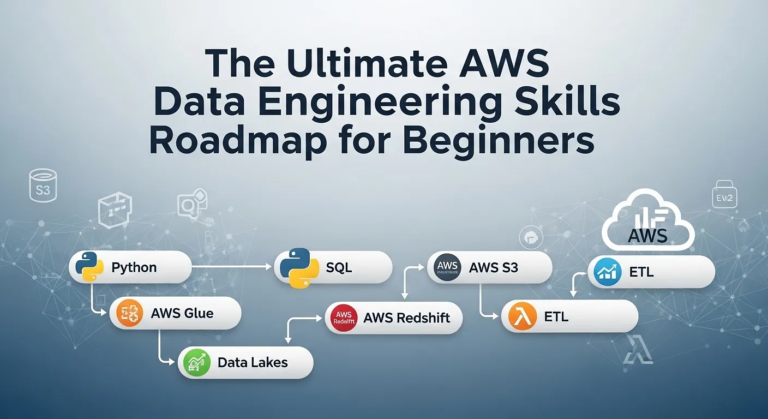
A senior data engineer knows that 90% of your work relies on a core stack: Amazon S3 (Storage), AWS Lambda (Serverless Compute), AWS Glue (ETL), Amazon Athena (Querying), and Amazon Redshift (Warehousing).
When you execute the AWS data engineering portfolio projects below, you are not just writing code. You are demonstrating:
- Architectural Thinking: You know how data flows from point A to point B.
- Cloud Security: You understand IAM (Identity and Access Management) roles and least-privilege permissions.
- Cost Awareness: You use serverless tools that cost pennies rather than leaving expensive EC2 instances running 24/7.
Here are the top five beginner ETL projects on AWS that will make your resume irresistible.
5 AWS Data Engineer Project Ideas for Beginners
Looking to get hired in 2026? Discover 5 standout AWS data engineer project ideas for beginners. Learn to build pipelines using S3, Glue, Lambda, and more!
Project 1: The Automated API Data Lake (Beginner)
Every data engineer must know how to ingest data from an external source. This project is the perfect starting point because it introduces you to serverless compute and cloud storage without overwhelming you with complex big data frameworks.
The Concept
You will write a Python script that automatically pulls live data from a public API (e.g., OpenWeatherMap, CoinGecko for crypto prices, or a Nairobi traffic API) every single day and saves it securely into an Amazon S3 bucket.
The Tech Stack
- Source: Public REST API
- Compute: AWS Lambda (Python/Boto3)
- Orchestration: Amazon EventBridge (formerly CloudWatch Events)
- Storage: Amazon S3
Step-by-Step Implementation
- Create an S3 Bucket: Set up a bucket named my-portfolio-raw-data-lake. Ensure it is private and not open to the public internet.
- Write the Python Script: Write a Python script using the requests library to fetch JSON data from your chosen API.
- Deploy to AWS Lambda: Create an AWS Lambda function. Paste your Python code here. You will need to import boto3 (the AWS SDK for Python) to take the JSON response and write it to your S3 bucket as a .json file. Append the current timestamp to the filename so you don’t overwrite yesterday’s data.
- Set IAM Permissions: Your Lambda function will fail initially. You must attach an IAM policy to the Lambda execution role granting it s3:PutObject permissions to your specific bucket.
- Automate It: Go to Amazon EventBridge and create a rule. Set a cron job expression (e.g., cron(0 12 * * ? *)) to trigger your Lambda function automatically every day at 12:00 PM.
The Resume Takeaway
How to write this on your resume: “Engineered a serverless automated data ingestion pipeline using AWS Lambda and EventBridge, successfully extracting daily API payloads and loading them into an Amazon S3 Data Lake with zero manual intervention.”
Need to brush up on your coding skills before starting? Read our guide on The Top 50 Python Data Science Interview Questions
Project 2: The Serverless ETL Pipeline (Intermediate)
Now that you have raw data in your S3 bucket, you need to clean it. This is one of the most classic AWS Glue and S3 project examples. You will take raw, messy data, clean it, change its format, and make it queryable.
The Concept
Take a large, messy CSV dataset (like a massive Kaggle dataset on global e-commerce sales). You will convert this slow-to-read CSV file into a highly optimized, columnar Parquet file using Apache Spark, and then query it using standard SQL.
The Tech Stack
- Storage: Amazon S3 (Two buckets: Raw-Zone and Processed-Zone)
- ETL Engine: AWS Glue (PySpark)
- Metadata Management: AWS Glue Data Catalog
- Analytics: Amazon Athena
Step-by-Step Implementation
- Upload Raw Data: Manually upload your messy CSV file into your Raw-Zone S3 bucket.
- Crawl the Data: Set up an AWS Glue Crawler. Point it at your Raw-Zone bucket. The Crawler will scan the CSV, figure out the schema (column names and data types), and create a table in the Glue Data Catalog.
- Write the ETL Job: Open AWS Glue Studio. Write a PySpark script (or use the visual editor if you are completely new to Python). Your script should:
- Drop columns containing sensitive PII (Personally Identifiable Information).
- Filter out rows with missing data (NULL values).
- Convert a ‘Date’ string column into a proper Timestamp data type.
- Load to Processed Zone: Have the script write the cleaned data to your Processed-Zone S3 bucket, saving it in Parquet format. (Parquet is cheaper and faster to query than CSV).
- Query with Athena: Open Amazon Athena. Because your data is in S3 and cataloged by Glue, you can immediately write a SELECT * FROM processed_table query and see your clean data in seconds.
The Resume Takeaway
How to write this on your resume: “Developed an end-to-end serverless ETL pipeline using AWS Glue and PySpark. Transformed multi-gigabyte CSV datasets into optimized Parquet formats, reducing Amazon Athena query costs and runtime by over 60%.”
Project 3: Real-Time Streaming Analytics (Advanced Beginner)
Batch processing (like Project 2) is great, but in 2026, modern companies need to see data the exact second it is generated. This project proves you understand streaming infrastructure.
The Concept
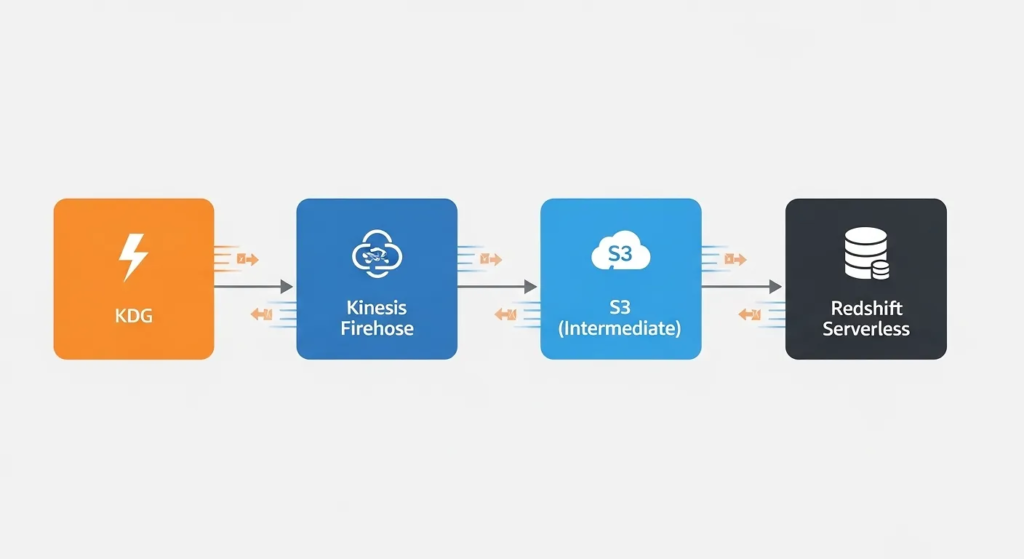
You will simulate live user clickstream data (e.g., users clicking on different products on an e-commerce website) and stream this data in near real-time into a data warehouse for immediate analysis.
The Tech Stack
- Data Generation: Amazon Kinesis Data Generator (KDG)
- Streaming Engine: Amazon Kinesis Data Firehose
- Storage/Warehousing: Amazon Redshift Serverless
Step-by-Step Implementation
- Set up Redshift Serverless: Provision an Amazon Redshift Serverless endpoint. This is the 2026 standard, meaning you don’t have to manage underlying clusters or nodes. Create a destination table for your clickstream data.
- Create the Firehose Stream: Open Kinesis Data Firehose. Set the source to “Direct PUT” and the destination to your Amazon Redshift table.
- Configure Buffering: Firehose doesn’t send data row-by-row (which would crash Redshift). Set it to buffer the data every 60 seconds or every 5MB, whichever comes first, before bulk-loading it into Redshift.
- Generate Fake Traffic: Use the open-source Amazon KDG tool. Connect it to your AWS account using Amazon Cognito. Write a simple JSON template to generate fake user IDs, timestamps, and “clicked_item” logs at a rate of 100 records per second.
- Analyze Live: Go to the Redshift Query Editor. Run a COUNT() query every minute, and watch as your database populates with thousands of rows of real-time data.
The Resume Takeaway
How to write this on your resume: “Architected a real-time streaming data pipeline using Amazon Kinesis Firehose, ingesting simulated high-velocity clickstream telemetry and buffering it into Amazon Redshift Serverless for sub-minute latency business intelligence.”
Project 4: The CI/CD Data Pipeline Orchestration (Standout)
Having Python scripts and AWS Glue jobs is great, but how do you manage them in a production environment? Real companies use orchestration and CI/CD (Continuous Integration/Continuous Deployment). This project will elevate you from “beginner” to “hirable junior engineer.”
The Concept
You will build a multi-step data pipeline that relies on conditions. If step one fails, step two should not run, and you should receive an email alert. You will orchestrate this using AWS Step Functions.
The Tech Stack
- Version Control: GitHub
- Orchestration: AWS Step Functions
- Compute: Multiple AWS Lambda functions
- Notifications: Amazon SNS (Simple Notification Service)
Step-by-Step Implementation
- Create Microservices: Write two separate AWS Lambda functions.
- Lambda A: Connects to a mock database and extracts data to S3.
- Lambda B: Reads the S3 data, calculates daily totals, and saves the summary.
- Set up SNS: Create an Amazon SNS Topic called Data-Pipeline-Alerts and subscribe your personal email address to it.
- Build the State Machine: Open AWS Step Functions. Use the visual Workflow Studio to drag and drop your logic.
- Start -> Run Lambda A.
- Choice State: Did Lambda A succeed?
- If YES -> Run Lambda B.
- If NO -> Trigger Amazon SNS to send you a failure email.
- Implement CI/CD: Push your Lambda Python code to a GitHub repository. Use GitHub Actions (or AWS CodePipeline) so that every time you update your Python script on GitHub, it automatically updates the code inside your AWS Lambda function without you logging into the AWS Console.
The Resume Takeaway
How to write this on your resume: “Implemented a robust, fault-tolerant workflow orchestration system using AWS Step Functions. Integrated Amazon SNS for automated failure alerting and utilized GitHub Actions to establish a modern CI/CD deployment lifecycle for data engineering microservices.”
Project 5: The GenAI-Powered Data Quality Checker (2026 Edge)
If you want to truly stand out in the 2026 job market, you must show that you know how to integrate Artificial Intelligence into data operations. Data Quality is the biggest headache for data teams. Let’s use AI to fix it.
The Concept
Whenever a new CSV file drops into an S3 bucket, an AI model automatically reads a sample of the data, detects anomalies, identifies PII, and generates a data dictionary outlining what the data represents.
The Tech Stack
- Storage: Amazon S3
- Compute: AWS Lambda
- Generative AI: Amazon Bedrock (Claude 3 or Titan models)
- NoSQL Database: Amazon DynamoDB
Step-by-Step Implementation
- S3 Trigger: Configure an S3 bucket to trigger an AWS Lambda function every time a file is uploaded using Event Notifications.
- Lambda Processing: The Lambda function reads the first 100 rows of the newly uploaded CSV using Pandas.
- Bedrock Integration: Using the boto3 Bedrock client, the Lambda function sends the sample data to an LLM (Large Language Model) hosted on Amazon Bedrock. The system prompt should be: “Analyze this data sample. Return a JSON object identifying the data types, any potential anomalies (like negative ages), and flag if any columns contain sensitive PII like phone numbers.”
- Store the Metadata: The Lambda function receives the AI’s JSON response and writes this metadata directly into an Amazon DynamoDB table.
- Review: You now have an automated, AI-driven data cataloging and quality-check system running entirely serverless!
The Resume Takeaway
How to write this on your resume: “Pioneered a Generative AI data governance pipeline integrating Amazon S3, AWS Lambda, and Amazon Bedrock. Automated the profiling, anomaly detection, and PII tagging of incoming datasets, storing metadata in Amazon DynamoDB for rapid auditing.”
How to Present Your Portfolio to Recruiters
Completing these data pipeline projects for resume building is only half the battle. If a recruiter clicks your GitHub link and sees a messy folder with just a script.py file, they will close the tab.
For every project above, your GitHub repository must include:
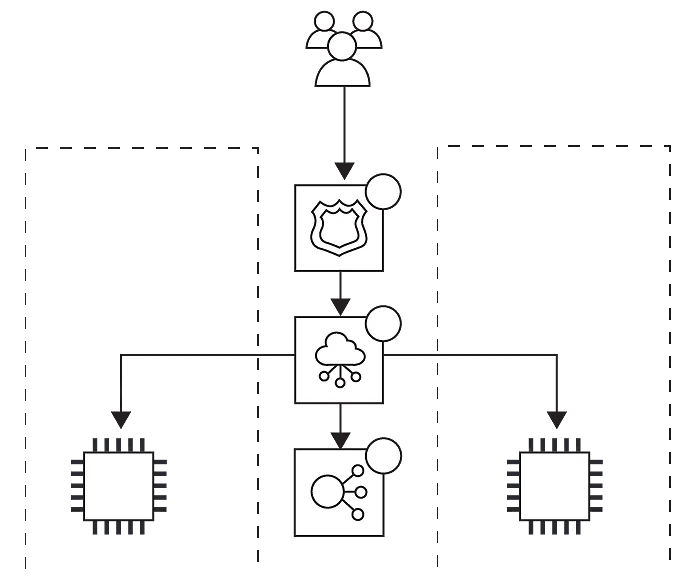
- An Architecture Diagram: Use tools like Draw.io or Lucidchart. Visuals prove you understand the cloud ecosystem.
- A Professional README.md: Include a project overview, the tech stack used, the business problem it solves, and instructions on how to deploy it.
- Clean, Commented Code: Adhere to PEP-8 Python standards.
- A Video Demo (Optional but lethal): Record a 2-minute Loom video of you walking through the architecture and showing the pipeline running. Link this video at the top of your README. This single step will put you ahead of 95% of candidates.
Best AWS Projects for Aspiring Data Engineers
To build a standout AWS Data Engineering portfolio in 2026, complete these 5 core projects:
- Automated API Ingestion: Use AWS Lambda and EventBridge to pull daily API data into Amazon S3.
- Serverless ETL Pipeline: Transform raw S3 CSV data into Parquet using AWS Glue PySpark and query with Athena.
- Real-Time Streaming: Ingest live clickstream data using Kinesis Firehose and buffer it into Redshift Serverless.
- Step Functions Orchestration: Build a multi-step Lambda pipeline with automated SNS email failure alerts.
- GenAI Data Quality: Trigger Amazon Bedrock via Lambda to automatically scan incoming S3 data for anomalies and PII.
Frequently Asked Questions (FAQs)
Q: Will these AWS data engineer project ideas cost me a lot of money to build?
A: No. If you use the AWS Free Tier carefully, these projects will cost pennies, if anything at all. S3, Lambda, and Step Functions have massive free tiers. Warning: Redshift Serverless and AWS Glue can incur charges if left running. Always destroy your resources (or set a $5 AWS Budget alert) immediately after you finish testing and screenshotting your project.
Q: Do I need all 5 projects on my resume to get hired?
A: Quality over quantity. Having two highly detailed, well-documented projects with architecture diagrams is significantly better than five poorly documented scripts. Start with Project 1 and Project 2. That is enough to prove your core competency.
Q: I don’t live in the US; can I use this portfolio to get remote jobs?
A: Absolutely. The beauty of cloud engineering is that it is borderless. Tech companies in the USA, Europe, and Australia frequently hire remote engineers from tech hubs in Kenya, Nigeria, and India. A robust GitHub portfolio transcends geographic borders and proves your technical communication skills.
Q: Should I learn Terraform or AWS CloudFormation for these projects?
A: For absolute beginners, build them via the AWS Management Console first to understand the GUI. However, for a massive resume boost, rewrite Project 1 using Infrastructure as Code (IaC) like Terraform. Being able to deploy an S3 bucket and Lambda function via Terraform is a highly sought-after 2026 skill.
Conclusion
The cloud data landscape can feel incredibly intimidating, but the secret to mastering it is practical application. By executing these five AWS data engineer project ideas, you are taking abstract concepts, like serverless computing, big data ETL, and AI integration, and turning them into tangible assets.
Pick one project today. Set up your AWS Free Tier account, draw your architecture diagram, and start coding. In the modern job market, the engineers who build in public are the engineers who get hired.