

Flat programmatic directories are causing a massive indexing crisis. If you are uploading bloated spreadsheets and hoping for organic traffic, it’s time to change course. Learn how to build scalable NextJS parent-child architectures for your SaaS today!
Table of Contents
The Death of Flat Programmatic SEO
Most SEO gurus are leading your SaaS directly into an indexing graveyard with brain-dead ‘CSV-to-Webflow’ setup advice. Real enterprise scale requires robust programmatic SEO site architecture templates for SaaS to survive modern search engine filters.
If your plan relies on uploading a bloated spreadsheet to a basic CMS and hoping for traffic, your organic strategy is dead on arrival.
[Guru Method: Flat Directory]
/compare-airtable-vs-notion (Orphaned)
/compare-monday-vs-asana    (Orphaned)
/compare-clickup-vs-jira    (Orphaned)
(Result: 64% Deindexed)

[Developer Method: Semantic Parent-Child Directory]
/compare (Hub)
   ├── /airtable (Parent Node)
   │     └── /vs-notion (Child Page)
   └── /monday (Parent Node)
         └── /vs-asana (Child Page)
(Result: 100% Crawl Efficiency)
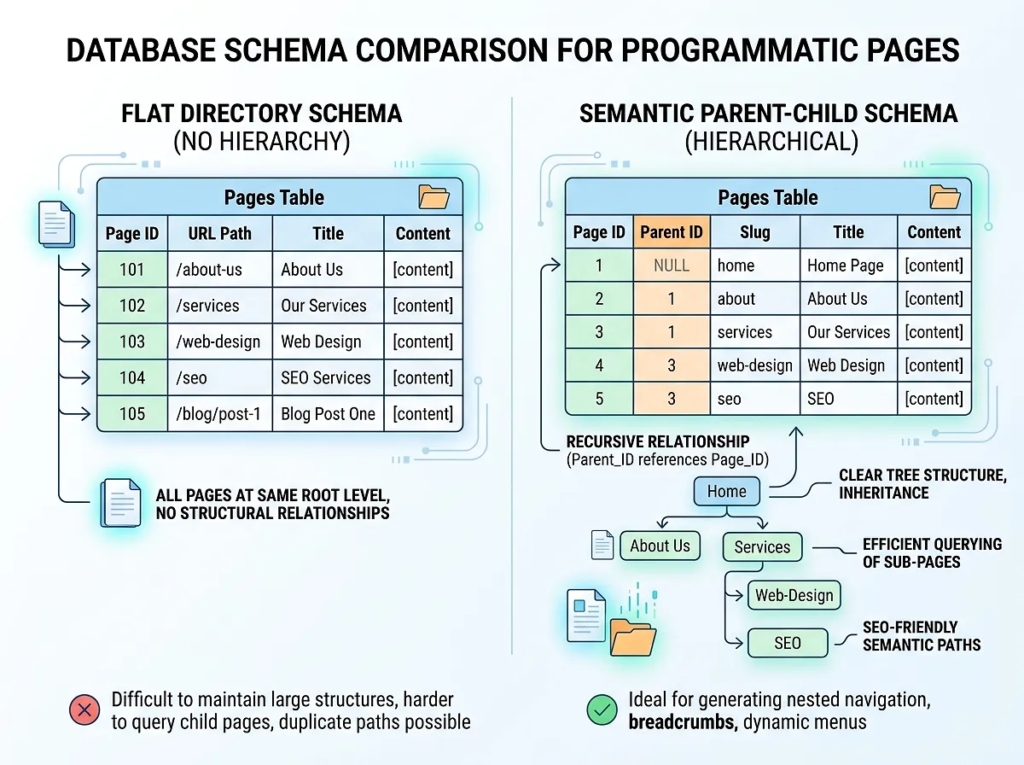
The Great ‘CSV-to-Webflow’ Lie Exposed
Low-effort course creators want you to believe that publishing thousands of auto-generated landing pages through simple CMS integrations is a viable acquisition channel. These amateur setups generate thousands of isolated pages with zero internal linking depth, creating massive crawl bottlenecks.
Search engine crawlers abandon these flat directories because they find no logical path through the website. Real engineering teams avoid these platforms for high-volume sites because database limitations and rigid structures prevent proper optimization.
The Mathematical Reality of the 2026 Indexing Crisis
According to 2026 indexing performance data, search engines are filtering out up to 64% of programmatic pages that rely on flat, unlinked URL structures, making semantic parent-child routing architectures and dynamic breadcrumbs mandatory for crawl budget preservation. Search engines simply refuse to allocate hardware resources to render-blocking pages that lack relational context.
Your site needs an intentional tech stack that serves lightweight HTML and defines clear parent-child relationships between directory levels. Implementing programmatic SEO site architecture templates for SaaS protects your crawling budget by ensuring no page exists as an unlinked orphan.
NextJS Programmatic SEO Architecture: Dynamic Routing Templates That Crawlers Love
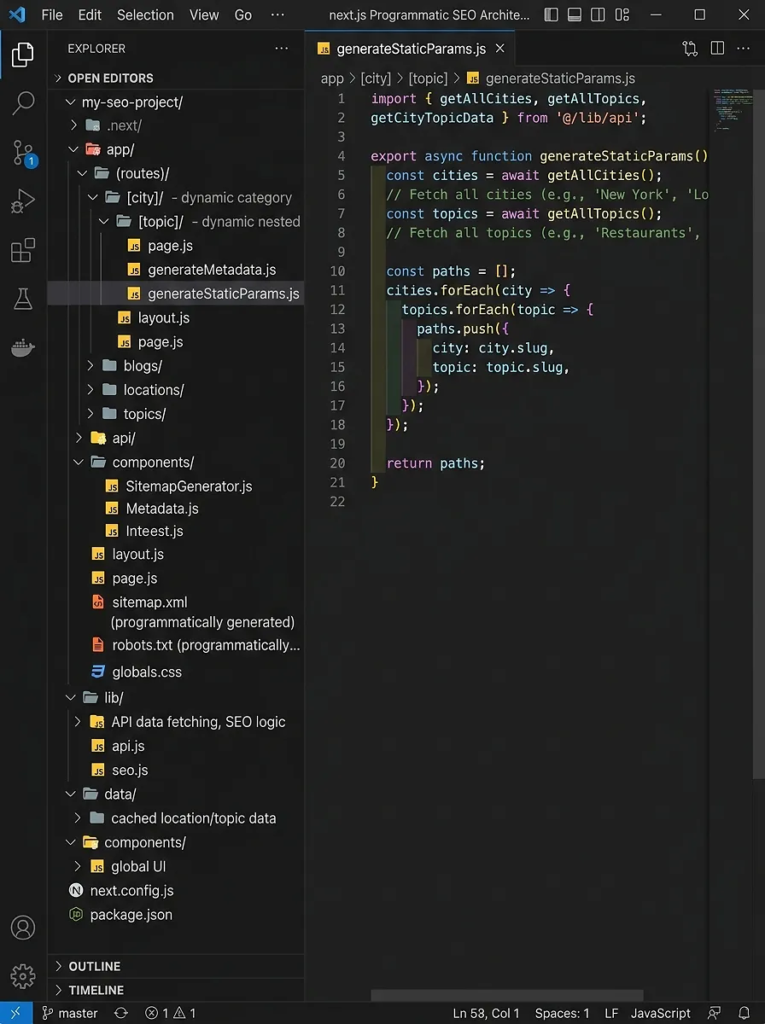
Modern search engine bots prioritize fast, static HTML responses that load without heavy JavaScript execution penalties. Implementing a NextJS programmatic SEO architecture ensures your pages render instantly, eliminating render-blocking bottlenecks before crawlers can flag them.
app/
├── compare/
│   ├── page.tsx                  # /compare (The Main Directory Hub)
│   └── [category]/
│       ├── page.tsx              # /compare/project-management (Category Node)
│       └── [slug]/
│           └── page.tsx          # /compare/project-management/asana-vs-jira (Target Page)
Designing a Semantic Parent-Child Directory Structure
Flat URL structures are highly inefficient for enterprise crawlers. Organizing your SaaS programmatic SEO dynamic routing into nested directories allows search engines to categorize your dynamic templates instantly.
A structured dynamic directory passes PageRank down from your authority hubs to your highly targeted comparison and integration long-tail pages. This logical grouping ensures that when a bot crawls your category hub, it effortlessly discovers every nested leaf node page in a single pass.
The Next.js App Router Folder Blueprint (/[category]/[slug]/page.tsx)
This nested structure handles infinite programmatic variants while keeping your codebase dry and highly performant. The code snippet below demonstrates how to configure your dynamic route handler to fetch page data and return static HTML.
// app/compare/[category]/[slug]/page.tsx
import { notFound } from 'next/navigation';
import { db } from '@/lib/db';
import { Metadata } from 'next';

interface RouteParams {
  params: Promise<{
    category: string;
    slug: string;
  }>;
}

export async function generateMetadata({ params }: RouteParams): Promise<Metadata> {
  const { category, slug } = await params;
  const page = await db.programmaticPage.findUnique({
    where: { slug_categorySlug: { slug, categorySlug: category } }
  });

  if (!page) return { title: 'Comparison Page' };

  return {
    title: page.metaTitle,
    description: page.metaDescription,
    alternates: {
      canonical: `https://your-saas.com/compare/${category}/${slug}`,
    },
  };
}

export default async function ProgrammaticPage({ params }: RouteParams) {
  const { category, slug } = await params;
  const page = await db.programmaticPage.findUnique({
    where: { slug_categorySlug: { slug, categorySlug: category } },
    include: { category: true }
  });

  if (!page) {
    notFound();
  }

  return (
    <article className="prose max-w-4xl mx-auto py-8">
      <nav aria-label="Breadcrumb" className="mb-4 text-sm text-gray-600">
        <ol className="flex space-x-2">
          <li><a href="/compare" className="hover:underline">Compare</a></li>
          <li>/</li>
          <li><a href={`/compare/${category}`} className="hover:underline">{page.category.name}</a></li>
          <li>/</li>
          <li className="font-semibold text-gray-900">{page.title}</li>
        </ol>
      </nav>
      <h1>{page.h1}</h1>
      <div dangerouslySetInnerHTML={{ __html: page.htmlContent }} />
    </article>
  );
}
Configuring dynamicParams and generateStaticParams for Speed
Pre-rendering your templates at build time is critical to achieving high search visibility. This configuration directs Next.js to compile your high-value revenue pages as static HTML files during the build process.
// Add this configuration inside app/compare/[category]/[slug]/page.tsx

export const dynamicParams = false; // Forces 404 for pages not generated at build time

export async function generateStaticParams() {
  const pages = await db.programmaticPage.findMany({
    select: {
      slug: true,
      categorySlug: true,
    },
    take: 1000, // Limit to top 1,000 high-priority pages to preserve build memory
  });

  return pages.map((page) => ({
    category: page.categorySlug,
    slug: page.slug,
  }));
}
Why this works
Setting dynamicParams = false ensures that Next.js does not attempt on-demand server rendering for non-existent routes when malicious bots spam your search parameters. Pre-rendering pages into static HTML files removes dynamic database queries from the crawl path, keeping server response times under 50 milliseconds.
The Database Schema for Programmatic Pages: Prisma & PostgreSQL Models
Scale requires an optimized relational database schema for programmatic pages to prevent duplicate content footprints. Your database must map dynamic attributes and localized tokens to structured fields rather than storing giant blobs of unorganized text.
┌────────────────────────────────────────────────────────┐
│                      Prisma Schema                     │
├───────────────────┐               ├────────────────────┤
│     Category      │               │  ProgrammaticPage  │
├───────────────────┤               ├────────────────────┤
│ - id (PK)         │1             *│ - id (PK)          │
│ - slug (Unique)   ├──────────────>│ - slug (Unique)    │
│ - name            │               │ - categorySlug (FK)│
└───────────────────┘               │ - variables (JSON) │
                                    └────────────────────┘
Defining the Relational Database Schema in Prisma
The schema must enforce strong relations between categories and pages. The Prisma model below prevents orphaned records and allows you to quickly pull related sibling pages for dynamic cross-linking modules.
datasource db {
  provider = "postgresql"
  url      = env("DATABASE_URL")
}

generator client {
  provider = "prisma-client-node"
}

model Category {
  id                String             @id @default(uuid())
  slug              String             @unique
  name              String
  description       String?
  programmaticPages ProgrammaticPage[]
  createdAt         DateTime           @default(now())
  updatedAt         DateTime           @updatedAt

  @@index([slug])
}

model ProgrammaticPage {
  id              String   @id @default(uuid())
  slug            String
  categorySlug    String
  category        Category @relation(fields: [categorySlug], references: [slug], onDelete: Cascade)
  title           String
  h1              String
  metaTitle       String
  metaDescription String
  htmlContent     String   @db.Text
  variables       Json     // Stores key-value replacement tokens for localized customization
  createdAt       DateTime @default(now())
  updatedAt       DateTime @updatedAt

  @@unique([slug, categorySlug])
  @@index([categorySlug])
  @@index([slug, categorySlug])
}
Managing Variable Tokens and Dynamic Page Metadata
Storing page variables inside a structured JSONB field in PostgreSQL allows you to dynamically populate templates without changing the database schema. Dynamic variables let you inject custom metrics, pricing details, and integration features into your metadata dynamically.
This approach prevents search engines from flagging your pages as thin content by inserting unique, context-specific tokens into every DOM element. Structured schemas allow you to scale your system to ten thousand unique pages while keeping your database footprint exceptionally light.
Optimizing Query Performance with Composite Database Indexes
Database latency directly kills crawler efficiency and lowers page experience signals. High-performance programmatic setups rely on strict database indexing to execute dynamic lookups instantly.
- Create a composite index on both
slugandcategorySlugfields to handle route matching queries in a single index scan. - Use Prisma migrations to execute the raw SQL index commands directly on your PostgreSQL engine.
- Configure connection pooling to prevent database bottlenecks during massive parallel build processes.
- Run
EXPLAIN ANALYZEon your primary routing queries to verify your database uses index scans instead of slow sequential scans.
Programmatic Internal Linking Strategy SaaS: Preventing Crawler Traps
A perfect URL structure is useless if search engine crawlers cannot navigate your site. Implementing a strict programmatic internal linking strategy SaaS ensures that every single dynamic node is connected to the primary site hierarchy.
               [Home / /compare Hub]
                /        |        \
         [Category]  [Category]  [Category]
          /      \    /      \    /      \
       [Page]--[Page][Page]--[Page][Page]--[Page]  <-- Sibling Cross-Linking
The PageRank Distribution Math for Directory Nodes
Search engines determine crawling frequency based on PageRank calculations across your link network. Standardize internal linking paths to avoid leakages that drain link equity from your primary conversion pages.
$$\text{PR}(A) = (1 – d) + d \left( \frac{\text{PR}(T_1)}{C(T_1)} + \dots + \frac{\text{PR}(T_n)}{C(T_n)} \right)$$
This formula dictates that a page’s authority ($PR(A)$) is directly tied to the authority of incoming links ($T_n$) divided by the total number of outgoing links ($C(T_n)$) on those source pages. If you isolate your programmatic pages in a flat hierarchy with no inbound paths, their equity drops to zero.
Connecting sibling comparisons in a loop topology keeps link value flowing throughout your category groups.
Automating Dynamic Breadcrumbs and Cross-Linking Hubs
Dynamic breadcrumb arrays must render on every page template to establish permanent structural links back to parent categories. These elements tell search engine spiders exactly where the current page lives in your overall site hierarchy.
// components/Breadcrumbs.tsx
import Link from 'next/link';

interface BreadcrumbItem {
  label: string;
  href: string;
}

export default function Breadcrumbs({ items }: { items: BreadcrumbItem[] }) {
  return (
    <nav aria-label="Breadcrumb" className="py-2 text-sm text-gray-500">
      <ol className="inline-flex items-center space-x-1 md:space-x-3">
        {items.map((item, index) => (
          <li key={item.href} className="inline-flex items-center">
            {index > 0 && <span className="mx-2 text-gray-400">/</span>}
            {index === items.length - 1 ? (
              <span className="text-gray-900 font-medium" aria-current="page">
                {item.label}
              </span>
            ) : (
              <Link href={item.href} className="hover:text-blue-600 transition-colors">
                {item.label}
              </Link>
            )}
          </li>
        ))}
      </ol>
    </nav>
  );
}
Securing Crawl Budget with Semantic HTML Component Layouts
Semantic HTML components communicate dynamic page priority to search engines without relying on client-side JavaScript execution. Using correct tags like <main>, <nav>, <aside>, and <footer> allows indexing bots to quickly strip away boilerplate global layouts.
This semantic separation helps search engines focus their parsing budgets on your high-value comparison content, boosting indexation rates.
Why this works
Automated internal linking patterns guarantee that search engine bots never hit a dead end on your website. Keeping every nested page within three clicks of the homepage ensures your crawl budget is spent indexing new pages rather than searching for orphaned links.
Deploy Your Programmatic Engine: Run a Free Audit with WebGaro
Launching thousands of programmatic landing pages without a technical review is a fast track to indexing failures and wasted developer resources. A single structural error in your routing code or database query execution can render your entire acquisition strategy useless.
Claim Your Free Technical Programmatic SEO Audit
Our team of elite technical SEO architects will analyze your existing dynamic routing structures and identify indexation bottlenecks. We look directly at your database schemas, internal linking topologies, and DOM element configurations to find hidden crawl budget issues.
How Our Architects Build Search Engines That Scale
We specialize in designing search-first web applications using programmatic SEO site architecture templates for SaaS. We replace fragile configurations with high-performance architectures built to convert organic traffic at scale.
Do not let bad advice turn your dynamic engine into a crawling failure.
Click Analyze My Site Architecture to book your technical architectural review with WebGaro today.
Frequently Asked Questions About Programmatic SEO Site Architecture Templates for SaaS
How does a dynamic database schema prevent search engine duplicate content penalties?
A dynamic database schema prevents duplication by utilizing programmatic variables to inject highly localized, context-specific metrics and content variations into every unique page template. This dynamic substitution ensures that search engines identify each URL as containing unique, valuable information rather than static template boilerplate.
Why is Next.js App Router preferred over flat dynamic routing architectures?
The Next.js App Router is preferred because its directory-based nested routing maps natively to semantic parent-child architectures, allowing you to establish logical hierarchies for search engines. It allows you to generate static HTML pages at build time with high efficiency, bypassing database bottlenecks during crawling passes.
What is a crawl budget trap, and how does programmatic internal linking prevent it?
A crawl budget trap occurs when a site contains thousands of orphan pages or endless duplicate parameters, forcing crawlers to waste processing energy without indexing key pages. Programmatic internal linking prevents this by establishing clear, structured HTML pathways that guide crawlers smoothly across your entire inventory.
You may also like: Local SEO Strategies for Startups