

Switched to a modern headless tech stack but saw your search rankings drop? You aren’t alone. Unoptimized API hops and JavaScript hydration bloat are likely destroying your Core Web Vitals.
Table of Contents
Why Your Decoupled Stack is Actually Killing Your SEO
The belief that decoupling your frontend from your backend instantly guarantees lightning-fast load times is a flat-out lie. Agencies sell you on the promise of clean code, but they leave your engineering team to figure out how to optimize headless CMS for Core Web Vitals manually. Performance does not happen by accident just because you switched to a modern tech stack.
According to 2026 web performance benchmarks, despite the theoretical speed of decoupled setups, over 68% of headless CMS migrations experience a post-launch dip in passing Core Web Vitals, primarily driven by unoptimized API latencies and heavy JavaScript hydration overhead. Your shiny new React or Vue frontend is likely slower than the monolithic platform you abandoned. Without aggressive optimization, your search visibility will plummet as Google rewards sites that prioritize real-user speed metrics.
The Myth of ‘Out-of-the-Box’ Speed in Headless Architecture
Marketing teams choose headless configurations because they want design freedom and rapid content publishing. Developers love them because they get to write modern JavaScript and use modern hosting providers. Modern headless setups, however, introduce complex network bottlenecks that traditional servers handle natively.
Every single page request on a decoupled site triggers a chain reaction of database queries, API fetches, and asset downloads. If your API gateway is in Oregon, your database is in Virginia, and your frontend server is in Frankfurt, your users are paying the latency tax. The resulting delay halts browser execution, leaving visitors staring at blank screens while your Largest Contentful Paint (LCP) score tanks.
The Real Reason Your Lighthouse Scores Are Plummeting
Lighthouse tests in clean, simulated environments often paint an unrealistic, overly optimistic picture of your performance. Real-world users access your site on sub-optimal mobile connections and mid-range devices. These actual user sessions reveal the structural flaws in your modern tech stack.
[User Browser] ---> (Network Latency) ---> [Frontend Edge Server]
                                                    |
                                            (API Request Hop)
                                                    |
                                                    v
[Database Gateway] <--- (DB Query) <--- [Headless CMS Engine]
Excessive client-side JavaScript execution blocks the main browser thread, preventing users from interacting with the page. Large payload sizes push your Cumulative Layout Shift (CLS) and Interaction to Next Paint (INP) scores deep into the red. You cannot solve these problems by simply installing a basic caching plugin or upgrading your hosting tier.
The Invisible Architectural Traps Destroying Your Metrics
Unseen architectural design flaws inside your decoupled framework frequently undermine search engine optimization efforts. Let’s look at the specific technical mechanics that ruin your Core Web Vitals metrics.
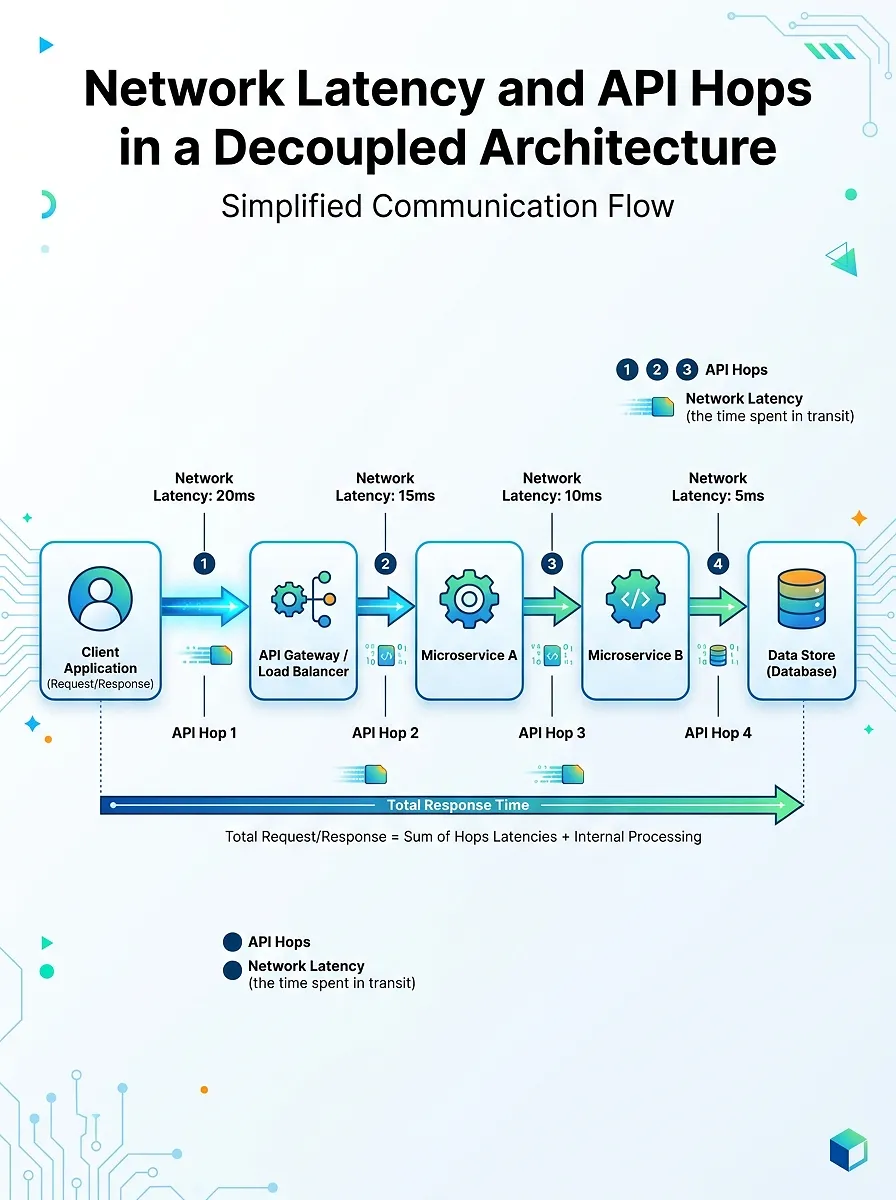
Un-Cached API Hops and the TTFB Nightmare
Every dynamic page render requires your frontend to make external HTTP requests to fetch content data. Without a system for decoupled architecture TTFB reduction, your server must wait for these external endpoints to respond before it can start sending the first byte of HTML to the browser. This chain reaction turns a simple document request into a slow, multi-second process.
// A common but dangerous pattern that increases TTFB
export async function getServerSideProps() {
  // Each await statement blocks the server render loop
  const settings = await fetch('https://api.cms.com/settings');
  const pageData = await fetch('https://api.cms.com/pages/home');
  const products = await fetch('https://api.cms.com/products');

  return {
    props: { settings: await settings.json(), pageData: await pageData.json(), products: await products.json() }
  };
}
This blocking behavior forces the browser to wait during the initial connection phase, directly inflating your Time to First Byte (TTFB). If your TTFB exceeds 800 milliseconds, you are already losing search ranking opportunities. Dynamic data must be cached at the network edge to prevent these costly server-side round trips.
How JavaScript Bloat Kills INP
Modern frameworks like Next.js or Nuxt require the browser to download, parse, and execute massive JavaScript bundles to make static HTML interactive. This process, known as hydration, locks up the single thread of the browser for critical seconds during initial page load. During this hydration phase, your user cannot click links, open navigation menus, or type into input forms.
Implementing a strategy for headless hydration performance optimization is the only way to safeguard your Interaction to Next Paint (INP) score. If a user clicks an interactive element while the main thread is busy executing JavaScript, the interface freezes, causing a poor INP score. The solution is simple: send less JavaScript to the browser and execute as much logic as possible on the server.
How Traditional Headless Architectures Fail Modern UX Benchmarks
Traditional single-page applications (SPAs) download a bare-bones HTML shell and construct the interface entirely within the browser. This approach is highly problematic for technical SEO because search crawlers may struggle to execute the JavaScript required to see your actual content. It also leads to massive rendering shifts as images, text blocks, and functional elements load asynchronously.
| Rendering Pattern | Server Workload | Client JS Payload | Target INP / LCP |
|---|---|---|---|
| Traditional Client-Side SPA | Low | Extremely High | Poor (Heavy Hydration) |
| Static Site Generation (SSG) | High (Build Time) | Moderate | Moderate (Page-load delay) |
| Edge-Rendered with SWR | Moderate | Very Low | Excellent (Instant Load) |
Your target search audience expects instant interaction, not loading spinners. Shifting render responsibility away from the client and onto edge networks is the key to running a high-ROI digital business.
How to Optimize Headless CMS for Core Web Vitals
To hit a perfect 100 mobile score, you must rewrite how your frontend fetches data, renders HTML, and serves content to the user. Follow this practical, step-by-step technical blueprint to eliminate performance bottlenecks.
Step 1: Implement Headless CMS Edge Caching with Stale-While-Revalidate
The fastest network request is the one that never has to run. By configuring stale-while-revalidate (SWR) headers, you serve pages instantly from global edge caches while updating the content in the background.
// Next.js Edge Cache configuration inside middleware.js or next.config.js
export const config = {
  runtime: 'edge',
};
export async function middleware(request) {
  const response = NextResponse.next();

  // Instruct CDN edge nodes to serve cached content instantly
  // Revalidate content in the background every 60 seconds
  response.headers.set(
    'Cache-Control',
    'public, s-maxage=60, stale-while-revalidate=600'
  );

  return response;
}
This strategy leverages edge computing platforms to cache API responses and HTML pages directly at the network boundary closest to your user. The edge node instantly returns the cached HTML file, dropping your TTFB to under 50 milliseconds. The cache-control headers ensure your site content updates automatically across global servers as soon as your writers update the CMS.
Step 2: Transition to Zero-Hydration and Server-Only Components
Do not ship JavaScript to the browser if you do not have to. React Server Components (RSC) and server-side frameworks allow you to render complex UI elements completely on your servers, keeping interactive scripts out of the client bundle.
// This component runs exclusively on the server, saving precious bundle size
import { CMSClient } from '@/lib/cms';
export default async function BlogPost({ params }) {
  const post = await CMSClient.getPost(params.slug);

  return (
    <article className="post-container">
      <h1>{post.title}</h1>
      {/* Static markup containing zero client-side JavaScript */}
      <div dangerouslySetInnerHTML={{ __html: post.content }} />
    </article>
  );
}
By transitioning to server components, you remove the CPU processing tax that slows down mobile devices. The browser receives lightweight, pre-rendered HTML and can display your main content instantly without running expensive layout calculations. This single structural change can slash your mobile bundle size by over 70%, immediately improving your LCP score.
Step 3: Implement Partial Hydration to Protect Your INP Scores
If a page requires complex client-side features, use partial or progressive hydration to load only the necessary code. This technique keeps interactive elements like search bars or checkout buttons non-blocking until the static parts of the page have finished rendering.
import dynamic from 'next/dynamic';
// Heavy interactive search component is loaded only when needed
const InteractiveSearch = dynamic(() => import('./InteractiveSearch'), {
  ssr: false,
  loading: () => <p>Loading Search Interface...</p>,
});
export default function PageLayout() {
  return (
    <header>
      <Logo />
      {/* Static navigation remains functional instantly */}
      <nav>Static Menu</nav>
      {/* Heavy JS components load asynchronously without blocking */}
      <InteractiveSearch />
    </header>
  );
}
This technique ensures that render-blocking DOM elements are handled before any heavy client-side scripts run. The main UI loads and registers user inputs without waiting for your interactive tools to initialize. Your pages load quickly and feel highly responsive, protecting your organic search positions.
Case Study: How to Improve Core Web Vitals Headless WordPress Implementations
Headless WordPress setups are often incredibly slow due to bloated WPGraphQL queries and heavy database schemas. To improve Core Web Vitals headless WordPress sites, you must implement edge caching directly on your API endpoints.
First, open your WordPress admin dashboard and navigate to GraphQL -> Settings. From this panel, check the option labeled Enable Query Cache and save your changes.
Next, implement an edge caching policy for your WPGraphQL API endpoint using this Cloudflare Worker configuration:
// Cloudflare Worker script to cache WPGraphQL queries at the edge
addEventListener('fetch', event => {
  event.respondWith(handleRequest(event.request))
})
async function handleRequest(request) {
  const url = new URL(request.url)

  // Only cache GraphQL queries, pass-through writes and mutation requests
  if (url.pathname === '/graphql' && request.method === 'POST') {
    const body = await request.clone().json()
    const isMutation = body.query && body.query.includes('mutation')

    if (!isMutation) {
      // Use query string hash as custom cache key
      const cacheKey = new Request(request.url, {
        method: 'GET',
        headers: request.headers
      })
      const cache = caches.default
      let response = await cache.match(cacheKey)

      if (!response) {
        response = await fetch(request)
        // Store API responses at the edge for 1 hour
        response = new Response(response.body, response)
        response.headers.set('Cache-Control', 'public, max-age=3600')
        event.waitUntil(cache.put(cacheKey, response.clone()))
      }
      return response
    }
  }
  return fetch(request)
}
Deploy this worker and configure your CDN routing rules to proxy all /graphql traffic through it. This setup stops heavy MySQL queries from reaching your origin server on every single page load, ensuring your API payloads load in milliseconds.
Stop Guessing: Secure Your 95+ Lighthouse Score Today
Building and maintaining a modern decoupled tech stack requires deep architectural expertise. If your web pages are taking longer than two seconds to load, you are actively driving away customers and wasting your organic search traffic.
Claim Your Free WebGaro Core Web Vitals Audit
Avoid losing business to faster competitors who have optimized their frontend architecture. Our team will review your existing headless stack, pinpoint database bottleneck regions, and identify the exact assets dragging down your Core Web Vitals. Click Run Free Diagnostic Audit to submit your website URL and receive a comprehensive, actionable performance roadmap.
Let WebGaro Refactor Your Headless Stack for Maximum Speed
If you are tired of debugging complex React hydration errors and managing un-cached API hops, let our senior engineering team handle it. We will refactor your React, Next.js, or WordPress frontend, implement edge-caching policies, and deliver a blazing-fast user experience. Click Submit Request to schedule a direct consultation call with our technical SEO leads.
Headless CMS Core Web Vitals Optimization FAQ
How does headless CMS edge caching impact TTFB?
By caching API payloads and rendered HTML pages on servers close to your global audience, edge caching bypasses the need to query your database on every single page load. This strategy dramatically reduces your Time to First Byte (TTFB) by sending static pages instantly to the browser, dropping response times down to under 50 milliseconds.
Why is hydration performance optimization critical for Interaction to Next Paint (INP)?
Hydration locks up the main browser thread while it parses and executes large JavaScript bundles on the user’s device. Implementing hydration performance optimization ensures that user interactions, like clicks or keystrokes, register instantly without being blocked by resource-heavy background scripts.
Can I improve Core Web Vitals on headless WordPress without a complete framework rewrite?
Yes, you can improve Core Web Vitals headless WordPress sites by caching WPGraphQL or REST API endpoints directly at the CDN edge. Implementing stale-while-revalidate headers and optimizing database indexes will also resolve performance bottlenecks without requiring you to rewrite your frontend layout code.
What is the target TTFB for a decoupled architecture?
Your target TTFB for a decoupled setup should always be under 200 milliseconds for stable user experiences. Any response time above 500 milliseconds indicates un-cached backend API queries and poor CDN configurations that will harm your rankings.