
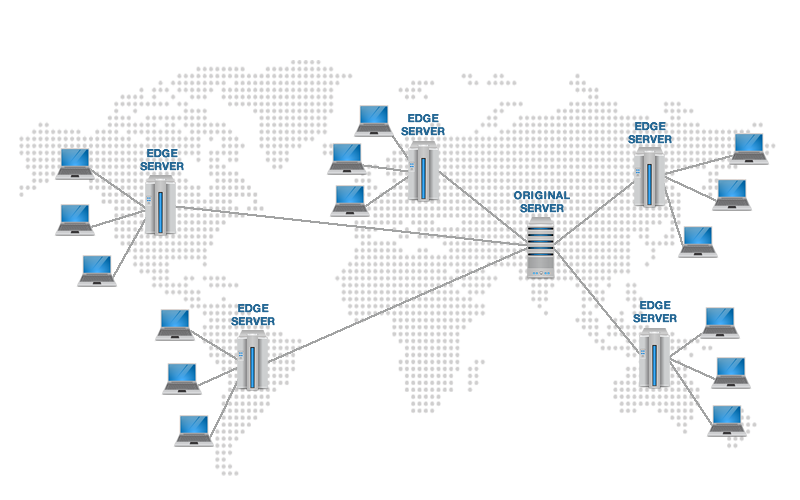
Are you tired of your WordPress site loading at a snail’s pace? Do you want to provide a lightning-fast experience for your visitors, regardless of their location? If so, you’re in the right place. Today, we’re diving into the world of Content Delivery Networks (CDNs) and how they can supercharge your WordPress site.
A CDN is like having a turbocharged engine for your website. It can dramatically reduce load times and improve user experience, which is crucial for both SEO and conversions.
In this comprehensive guide, we’ll explore the 20 best CDNs for WordPress, covering both free and paid options. Whether you’re a blogger, e-commerce store owner, or run a high-traffic corporate site, you’ll find a CDN solution that fits your needs and budget.
Table of Contents
Benefits of Using a CDN for Your WordPress Site?
Before we dive into the list, let’s quickly recap why using a CDN is crucial for your WordPress site:
- Faster page load times
- Improved user experience
- Better search engine rankings
- Reduced server load
- Enhanced security against DDoS attacks
- Global reach and consistent performance
Best CDNs for WordPress
Discover the 20 best CDNs for WordPress, including free and paid options. Improve your website speed and performance with our expert-recommended content delivery networks. Now, let’s explore the top 20 CDNs that can deliver these benefits to your WordPress site.
1. Cloudflare

Cloudflare is one of the most popular CDNs, offering a robust free tier that’s perfect for many WordPress sites.
Key features:
- Global network of data centers
- DDoS protection
- SSL certificate included
- Easy setup with WordPress plugins
Pricing: Free plan available, paid plans start at $20/month
2. Jetpack (formerly Photon)
Jetpack’s CDN, previously known as Photon, is a free service that focuses on image optimization and delivery.
Key features:
- Automatic image optimization
- No configuration required
- Works seamlessly with WordPress
Pricing: Free with Jetpack plugin
3. BunnyCDN
BunnyCDN offers a user-friendly CDN solution with a free tier for small websites.
Key features:
- Simple setup process
- Pay-as-you-go pricing
- Pullzone-based configuration
Pricing: Free tier available, paid plans start at $10/month
4. KeyCDN
KeyCDN provides a developer-friendly CDN with a free trial to test their services.
Key features:
- RESTful API
- Real-time analytics
- Custom SSL certificates
Pricing: Free trial available, pay-as-you-go pricing starts at $0.04/GB
5. CDN77
CDN77 offers free CDN services for open-source projects, making it an excellent option for WordPress plugin and theme developers.
Key features:
- High-performance network
- DDoS protection
- Easy integration with WordPress
Pricing: Free for open-source projects, paid plans start at $199/month
6. StackPath
StackPath (formerly MaxCDN) is a popular choice among WordPress users for its ease of use and performance.
Key features:
- Edge computing capabilities
- Real-time analytics
- Website acceleration
Pricing: Plans start at $20/month
7. Amazon CloudFront
As part of the AWS ecosystem, Amazon CloudFront offers a scalable and reliable CDN solution.
Key features:
- Global edge locations
- Integration with other AWS services
- Pay-as-you-go pricing
Pricing: Pay-as-you-go, starting at $0.085/GB for the first 10TB
8. Google Cloud CDN
Google Cloud CDN leverages Google’s global network to deliver content quickly and efficiently.
Key features:
- Integration with Google Cloud Platform
- Anycast routing
- HTTPS load balancing
Pricing: Pay-as-you-go, starting at $0.08/GB for the first 10TB
9. Akamai
Akamai is an enterprise-level CDN known for its extensive global network and advanced features.
Key features:
- Massive global network
- Advanced security features
- Media delivery optimization
Pricing: Custom pricing, contact sales for details
10. Fastly
Fastly offers a modern, API-driven CDN that’s popular among developers and large websites.
Key features:
- Real-time purging
- Instant configuration changes
- Edge computing capabilities
Pricing: Pay-as-you-go, custom pricing available
11. MaxCDN (now part of StackPath)
MaxCDN, now integrated into StackPath, remains a popular choice for WordPress users due to its simplicity and effectiveness.
Key features:
- Easy WordPress integration
- Real-time analytics
- Multiple caching options
Pricing: Plans start at $20/month (as part of StackPath)
12. Sucuri
Sucuri offers a unique combination of CDN and security services, making it an excellent choice for WordPress sites concerned about performance and protection.
Key features:
- Website firewall
- DDoS protection
- Malware scanning and removal
Pricing: Plans start at $199.99/year
13. Imperva
Imperva (formerly Incapsula) provides enterprise-level CDN services with a focus on security and performance optimization.
Key features:
- Advanced bot protection
- Layer 7 DDoS mitigation
- Load balancing
Pricing: Custom pricing, contact sales for details
14. Cloudinary
Cloudinary specializes in image and video optimization, making it an excellent choice for media-heavy WordPress sites.
Key features:
- Automatic image optimization
- Responsive image delivery
- Video transcoding and streaming
Pricing: Free tier available, paid plans start at $89/month
15. jsDelivr
jsDelivr is a free, open-source CDN that’s particularly useful for serving JavaScript libraries and other front-end assets.
Key features:
- Multi-CDN architecture
- npm and GitHub integration
- Free for commercial use
Pricing: Free
16. Azure CDN
Microsoft’s Azure CDN leverages the company’s global network to provide fast content delivery for WordPress sites.
Key features:
- Integration with Azure services
- Dynamic site acceleration
- Rules engine for content handling
Pricing: Pay-as-you-go, starting at $0.081/GB for the first 10TB
17. CacheFly
CacheFly is known for its TCP anycast technology, which can significantly improve content delivery speeds.
Key features:
- TokenGen for secure content delivery
- Real-time analytics
- Custom SSL certificates
Pricing: Plans start at $295/month
18. CDNetworks
CDNetworks offers a global CDN solution with a strong presence in Asia, making it an excellent choice for WordPress sites targeting Asian markets.
Key features:
- Dynamic content acceleration
- Cloud security
- Live streaming capabilities
Pricing: Custom pricing, contact sales for details
19. Limelight Networks
Limelight Networks provides a robust CDN solution with a focus on high-performance delivery and edge computing.
Key features:
- Edge compute capabilities
- Multi-CDN orchestration
- Advanced video delivery
Pricing: Custom pricing, contact sales for details
20. Rackspace CDN
Rackspace CDN offers a straightforward content delivery solution that integrates well with other Rackspace services.
Key features:
- Easy-to-use control panel
- API access
- Flexible origin pull options
Pricing: Pay-as-you-go, starting at $0.12/GB for the first 10TB
Comparing Free and Paid CDN Options
Free CDNs for WordPress
- Cloudflare
- Jetpack (formerly Photon)
- BunnyCDN (Free tier available)
- KeyCDN (Free trial available)
- CDN77 (Free for open-source projects)
Paid CDNs for WordPress
- StackPath
- Amazon CloudFront
- Google Cloud CDN
- Akamai
- Fastly
- MaxCDN (now part of StackPath)
- Sucuri
- Imperva
- Cloudinary
- jsDelivr
- Azure CDN
- CacheFly
- CDNetworks
- Limelight Networks
- Rackspace CDN
When deciding between free and paid CDN options for your WordPress site, consider the following:
Free CDNs:
- Pros: No cost, basic features, good for small sites
- Cons: Limited bandwidth, fewer features, less control
Paid CDNs:
- Pros: Higher performance, more features, better support
- Cons: Additional cost, may require technical setup
For most small to medium-sized WordPress sites, a free CDN like Cloudflare can provide significant performance improvements. However, as your site grows, investing in a paid CDN can offer more advanced features and better scalability.
How to Choose the Right CDN for Your WordPress Site
When selecting a CDN for your WordPress site, consider the following factors:
- Budget: Determine how much you’re willing to spend on CDN services
- Traffic volume: Estimate your monthly traffic and data transfer needs
- Geographic reach: Consider where your target audience is located
- Features: Evaluate which CDN features are most important for your site
- Ease of use: Look for CDNs with simple WordPress integration
- Support: Check the level of customer support provided
Remember, the best CDN for your WordPress site depends on your specific needs and circumstances.
Implementing a CDN on Your WordPress Site
Once you’ve chosen a CDN, follow these general steps to implement it:
- Sign up for the CDN service
- Configure your CDN settings
- Install a WordPress CDN plugin (if available)
- Update your DNS settings
- Test your site to ensure the CDN is working correctly
Pro tip: Always test your site thoroughly after implementing a CDN to ensure all content is being served correctly.
Optimizing Your WordPress Site for CDN Usage
To get the most out of your chosen CDN, consider these optimization tips:
- Minify and compress your CSS and JavaScript files
- Optimize images before uploading to WordPress
- Use a caching plugin in conjunction with your CDN
- Configure browser caching for static assets
- Regularly audit and remove unused plugins and themes
Remember, a CDN is most effective when your WordPress site is already optimized for performance.
Measuring CDN Performance
To ensure your chosen CDN is improving your WordPress site’s performance, use these tools:
- GTmetrix
- Pingdom
- WebPageTest
- Google PageSpeed Insights
- KeyCDN Performance Test

Monitor your site’s performance before and after implementing a CDN to quantify the improvements.
Frequently Asked Questions
Q1: Will using a CDN improve my WordPress site’s SEO?
A: Yes, a CDN can improve your site’s speed and performance, which are important factors in search engine rankings.
Q2: Can I use multiple CDNs on my WordPress site?
A: While it’s possible, it’s generally not recommended as it can complicate your setup and potentially lead to conflicts.
Q3: Do I need a CDN if I have a small WordPress site?
A: Even small sites can benefit from a CDN, especially if you have a global audience. Many free options are available for smaller sites.
Q4: How do I know if my CDN is working correctly?
A: You can use tools like GTmetrix or Pingdom to check your site’s load times and see if content is being served from CDN URLs.
Q5: Can a CDN help protect my WordPress site from attacks?
A: Many CDNs offer security features like DDoS protection and web application firewalls, which can help safeguard your site.
Conclusion
In conclusion, implementing a CDN can significantly improve your WordPress site’s performance, user experience, and global reach. By choosing the right CDN from our list of the 20 best options, you’ll be well on your way to a faster, more efficient website.
Remember, the world of CDNs is constantly evolving, so keep an eye out for new features and providers that could benefit your WordPress site. Which CDN are you most excited to try? Share your thoughts and experiences in the comments below!