
If you want to dominate Google search this year, you need to master Core Web Vitals. The days of tricking search engines with keyword-stuffed pages and massive backlink profiles while ignoring user experience are over.
Google’s algorithms are more sophisticated than ever. With AI Overviews (formerly SGE) and zero-click searches taking up prime real estate, Google is strictly reserving top organic spots for websites that deliver instantaneous, seamless, and visually stable user experiences.
In this comprehensive guide, we are going to dissect the modern Core Web Vitals metrics. We will move past the basic advice you’ve heard a thousand times and dive into advanced, expert-level strategies to optimize your Largest Contentful Paint, conquer Interaction to Next Paint, and permanently eliminate layout shifts. Let’s get your site in the green.
Table of Contents
What Are Core Web Vitals in 2026?
Introduced by Google, Core Web Vitals (CWV) are a subset of factors that make up the overall “Page Experience” signal. They are real-world, user-centric metrics that measure three distinct aspects of the web user’s experience:
- Loading Performance
- Interactivity and Responsiveness
- Visual Stability

Unlike lab data (which simulates how a page might load), Google ranks your site based on Field Data collected from the Chrome User Experience Report (CrUX). This means your scores are determined by how actual human beings, on varying devices and network speeds, experience your website over the last 28 days.
Learn more: Core Web Vitals Impact on E-Commerce Revenue
The Big Three: Understanding the 2026 Metrics
To fix your website, you must understand exactly what Google is measuring. Let’s break down the three pillars of Core Web Vitals.
1. Largest Contentful Paint (LCP)
What it measures: Loading Speed. Specifically, LCP measures the time it takes for the largest single piece of content (usually a hero image, video poster, or large block of text) to render on the user’s screen.
The Benchmark:
- Good: Under 2.5 seconds
- Needs Improvement: 2.5 – 4.0 seconds
- Poor: Over 4.0 seconds
Why does LCP matter so much? Because it tells the user that the page is actually useful. If they stare at a blank screen or a loading spinner for three seconds, they will hit the back button, sending a massive negative signal to Google.
Learn more: Why is My LCP Slow on Mobile but Fast on Desktop
2. Interaction to Next Paint (INP)
What it measures: Interactivity. INP officially replaced First Input Delay (FID) back in 2024, and by 2026, it is the most critical metric developers struggle with. INP measures the overall responsiveness of your page to user interactions (clicks, taps, keyboard inputs) throughout the entire lifespan of the user’s visit, not just the first click.
The Benchmark:
- Good: Under 200 milliseconds
- Needs Improvement: 200 – 500 milliseconds
- Poor: Over 500 milliseconds
If a user clicks an “Add to Cart” button or opens a mobile menu, and the site freezes for a half-second before responding, your INP score fails. This is almost always caused by heavy JavaScript blocking the browser’s main thread.
3. Cumulative Layout Shift (CLS)
What it measures: Visual Stability. CLS measures how much the elements on your page jump around while the screen is loading.
The Benchmark:
- Good: Under 0.1
- Needs Improvement: 0.1 – 0.25
- Poor: Over 0.25
Imagine reading an article, and just as you go to click a link, an ad loads at the top of the page, pushing the content down, causing you to click on something you didn’t intend to. That is a poor CLS experience. Google penalizes websites that frustrate users with unexpected layout shifts.
Why Core Web Vitals Matter More Than Ever for SEO
If your content is brilliant but your Core Web Vitals are terrible, can you still rank? Yes. Google states that great content still wins.
However, in the highly competitive search market, everyone has great content. When you and your top competitor both have high-quality, comprehensive articles with strong Domain Authority, Google uses Core Web Vitals as the tie-breaker.
Furthermore, poor CWV scores destroy your conversion rates. Research consistently shows that a 1-second delay in mobile load times can impact conversion rates by up to 20%. Optimizing these metrics is not just an SEO strategy; it’s a revenue-generation strategy.
How to Run a PageSpeed Insights Audit
Before you can fix anything, you need a baseline. The most accessible way to measure your site is through a PageSpeed Insights audit.
- Go to Google PageSpeed Insights.
- Enter your URL.
- Look closely at the “Discover what your real users are experiencing” section. This is your CrUX field data. This is what Google actually uses for rankings.
- Switch between the “Mobile” and “Desktop” tabs. Focus 90% of your energy on the Mobile tab, as Google uses mobile-first indexing.
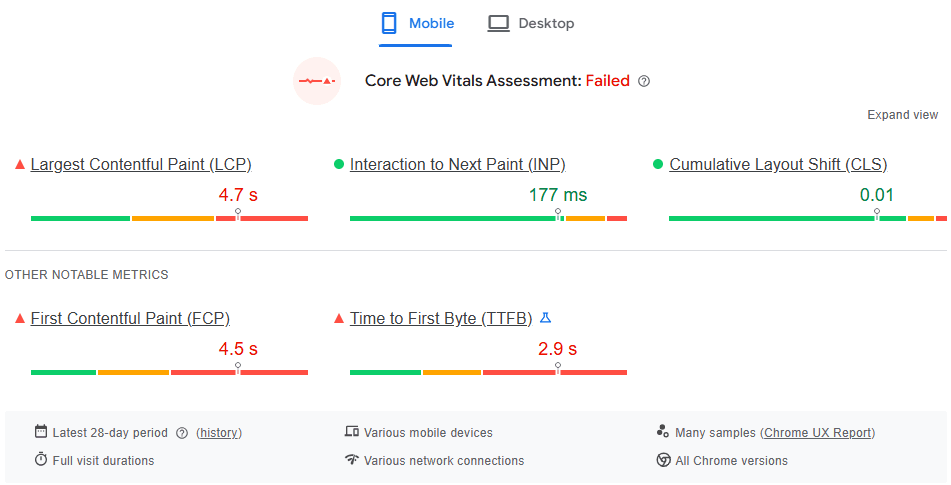
Expert Insight: Don’t just audit your homepage. Your homepage is often heavily optimized, but organic traffic usually lands on blog posts, product pages, or category pages. Audit your templated pages individually through Google Search Console’s “Core Web Vitals” report to find systemic issues.
Expert Strategies: How to Pass Core Web Vitals 2026
Now that we know the rules, let’s look at how to win the game. These are advanced, proven strategies to push your site into the green.
Largest Contentful Paint Optimization
LCP optimization usually boils down to four sub-parts: Time to First Byte (TTFB), Resource Load Delay, Resource Load Time, and Element Render Delay. Here is how to conquer them:
- Implement Speculation Rules API: In 2026, relying solely on standard preloading is outdated. The modern approach is using the Speculation Rules API. This allows browsers to pre-render full pages in the background based on where the user’s mouse is hovering, making navigation feel strictly instantaneous.
- Use Next-Gen Images: Never use full-size JPEGs or PNGs for your hero images. Switch your infrastructure to deliver AVIF images.

- Fetch Priority: Use the HTML attribute fetchpriority=”high” on your LCP image. This explicitly tells the browser to bump this image to the top of the download queue.
- Delay Non-Critical Resources: Ensure that third-party scripts, chat widgets, and below-the-fold images do not steal bandwidth from your hero image.
Mastering the INP Score (Interaction to Next Paint)
Fixing INP is heavily reliant on JavaScript optimization. If you want to improve INP score, you have to free up the browser’s main thread.
- Yield to the Main Thread: Break up long-running JavaScript tasks. If a task takes longer than 50ms, it blocks the main thread. Use techniques like setTimeout or the modern scheduler.yield() API to pause long scripts, allowing the browser to respond to user clicks, before resuming the script.
- Offload Third-Party Scripts with Partytown: Analytics, tracking pixels, and CRM scripts are notorious INP killers. Use libraries like Builder.io’s Partytown to move these third-party scripts to a Web Worker, pulling them completely off the main thread.
- Reduce DOM Size: A massive, deeply nested HTML structure forces the browser to work overtime recalculating styles whenever a user interacts with the page. Keep your DOM tree shallow (under 1,500 total nodes) and use CSS content-visibility: auto to skip rendering off-screen elements.
Cumulative Layout Shift Fixes
Of all the metrics, CLS is often the easiest to fix because the solutions are straightforward HTML and CSS adjustments.
- Explicit Aspect Ratios: Always provide width and height attributes for images and videos in your HTML. This allows the browser to reserve the exact amount of space needed before the image actually downloads, preventing the text below it from shifting.
- Pre-allocate Ad Space: If you monetize via display ads, wrap your ad units in a container div with a fixed CSS minimum height. Even if the ad loads slowly or fails to fill, the space remains empty, saving your layout from shifting.
- Web Font Optimization: Custom fonts often cause FOUT (Flash of Unstyled Text) or FOIT (Flash of Invisible Text), both of which trigger layout shifts when the custom font finally loads. Use font-display: optional in your CSS, which tells the browser to use a fallback font immediately and not swap it if the custom font takes too long to load.
- Avoid Dynamic Injections: Never inject banners, pop-ups, or GDPR cookie notices at the top of the viewport dynamically. If you must display a notice, overlay it via CSS position: fixed or absolute so it doesn’t push the actual page content down.
Smart Image Resizer
A powerful yet simple tool that lets you
resize images without distortion, blur, or pixelation.
Local SEO and Core Web Vitals
Here is a topic most people miss: Core Web Vitals are highly geographical.
If you are running a local business in the USA, your target audience is searching from mobile devices, potentially in areas with spotty 5G coverage or while driving on older 4G networks. Google’s CrUX data measures their real-world speeds.
- Hyper-Local Edge Caching: It’s not enough to just use a CDN. You need Edge Computing. Services like Cloudflare Workers or Fastly allow you to cache not just static assets, but the actual HTML of your site at server nodes physically located in the exact city of your target audience.
- Local SEO Impact: By drastically lowering your TTFB for local users, your LCP plummets, mobile bounce rates drop, and your local search rankings (especially in the Google Map Pack) receive a massive positive UX signal.
Future-Proofing: Beyond the Big Three
While LCP, INP, and CLS are the “Core” metrics right now, Google is constantly experimenting. To future-proof your technical SEO strategy, keep an eye on these supplementary metrics:
- Time to First Byte (TTFB): The foundation of all speed metrics. If your server is slow to respond, LCP is impossible to fix.
- First Contentful Paint (FCP): The time it takes for the very first pixel to render.
- Smoothness Metrics: Google is actively researching metrics that track dropped frames during scrolling and animations. Ensure your CSS animations use transform and opacity (which are GPU-accelerated) rather than animating margins or heights.
FAQ: Core Web Vitals 2026
Yes, but Google primarily uses Mobile-First Indexing. While desktop CWV scores are measured, your mobile scores have a significantly larger impact on your overall organic search visibility.
No. Core Web Vitals are a prerequisite, not a silver bullet. You still need high-quality content, targeted keyword strategy, and strong backlinks. CWV is the tie-breaker in highly competitive SERPs.
Core Web Vitals are based on a 28-day rolling average of real user data. After pushing fixes live, it will take up to 28 days for your Google Search Console reports to fully reflect the improvements.
No, but they require strict management. Out-of-the-box WordPress can be slow if loaded with bloated themes and dozens of plugins. Headless WordPress or highly optimized traditional setups using caching plugins can easily pass CWV.
Learn more: Technical API implementations
Conclusion: Stop Guessing, Start Optimizing
Ignoring Core Web Vitals 2026 is like leaving money on the table. The web has moved past the era of slow, clunky, ad-heavy websites. Users demand speed, interactivity, and stability, and Google is aggressively rewarding websites that deliver it.
By auditing your PageSpeed Insights, leveraging next-gen formats for LCP, freeing up your main thread for INP, and locking down your CSS for CLS, you create an unstoppable foundation for your SEO campaigns. Stop treating technical SEO as an afterthought, and start treating it as your primary competitive advantage.
We Want to Hear From You! (Join the Discussion)
What is the hardest Core Web Vitals metric for your team to pass? Are you still fighting with INP, or is LCP causing you headaches? Drop a comment below with your biggest site speed challenge, and our technical SEO team might just reply with a custom solution!